Best for freelancers and SMEs in Malaysia
on PC or mobile
Side by side PC Live Preview. Mobile Live Preview sits below the document form.
Tap any picture to see it bigger.
Documents
Quotation, Invoice, D.O, Receipt, P.V & P.O for small businesses in Malaysia. All kept in one Tracker.
Quotation
With your terms and a validity date.
Invoice
Due date, SST and your customer's P.O.
Delivery order
Quantities only. Prices stay off.
Receipt
Payment method and a thank-you line.
Payment voucher
With signature lines for both sides.
Purchase order
To your supplier, with delivery date and address.
Numbers that never clash
Each new document takes the next number by itself, with your own prefix such as QTN- or INV-. The same number can never be used twice, even when you work on both PC and mobile.
Totals and SST worked out for you
Type the quantity and unit rate. Subtotals, the total and SST are counted for you, so there are no sums to check twice.
One button: save and create a PDF
Press Save & create PDF. The record is saved and a ready PDF downloads, to send on WhatsApp or by email.
Saved documents are locked
Once saved, the document can't be changed or deleted. What your customer received always matches your record and no price or number can be quietly altered later. Made one by mistake? Cancel it: it keeps its number and its PDF shows a CANCELLED stamp with your reason.
Signature, stamp or none
Add pictures of your own signature and company stamp to any document. Or tick "Computer-generated. No signature required." and that line prints instead.
In English or Malay
Choose the document language for each letterhead. Titles, terms and closing lines print in that language and the running number carries on whichever you use.
Why a PDF
One press and you have a proper file, ready to keep or to send.
Saves straight to mobile phone
On an iPhone it lands in Files, on Android in Downloads. From there you send it on WhatsApp or attach it to an email like any other file.
No web address printed across it
Print a web page from a browser and the link, date and time are stamped onto every sheet for your customer to see. A PDF from webjela carries only your letterhead.
Looks the same for everyone
Whatever mobile phone, computer or printer opens it, nothing shifts. No missing fonts, no columns sliding out of line.
Nobody changes it by accident
A price cannot be nudged while someone is reading it. What you sent is exactly what they hold.
Show your PDF anytime
Once it is saved on your mobile, you can show it at a customer’s shop anytime.
Proper A4, ready to print
Real page sizing, so it prints correctly, folds into an envelope and files in a folder like any other document.
webjela makes ordinary business documents — quotations, invoices, delivery orders, receipts, payment vouchers and purchase orders. It does not produce LHDN e-Invoices and it does not send anything to MyInvois.
It is for micro and small businesses that are below the e-Invoice threshold, which LHDN raised to RM 3 million in annual turnover in 2026. If you are not sure whether that applies to you, please check with LHDN or your accountant first.
Letterhead
Your logo, address, SSM and SST numbers on every Quotation and Invoice.
Signature and stamp
Contact list
Drafts
Tracker
Find any Quotation or Invoice again in seconds. It joins your Tracker the moment you save.
Export everything to Excel
See at a glance what is sent, accepted, unpaid or paid.
A status on every document
Sent, Accepted, Unpaid, Paid, Delivered and more. Tap it in the Tracker to change it and see when it changed.
Never miss an unpaid invoice
Filter the Tracker by status to see every unpaid or overdue invoice in one list.
Payments mark invoices Paid
A Receipt or P.V can pay one or more invoices or P.Os. They show Paid or Partly paid by themselves and + Receipt / + P.V in the Tracker fills in the payment for you.
Security
Private to your account
Each account is kept apart from every other. No other user can see your customers, prices or documents.
Secure sign-in
Your email is confirmed before the first sign-in, everything travels over an encrypted connection and the app only opens once you are signed in.
Auto back up every night
A locked copy of all records is made every night and kept in a separate safe place, so nothing is lost if something goes wrong.
Take your data with you
Export everything to Excel whenever you like. Your records are always yours.
Everyday use
It runs in your web browser, so there is no app to download, no updates to run and no storage to clear. Sign in on any device and your work is there.
Light or dark
One tap on the sun or moon switches the look. Your documents print the same either way.
Easy "How to?" guide
Tap the "?" button in the app for short step-by-step help, in English or Malay.
English and Malay
The app, this website, the "How to?" guide and our update notes come in both languages. Your documents can be printed in either one.
Open it like an app: add it to your home screen
Sign in once, then do this on your mobile phone. A webjela icon appears next to your other apps.
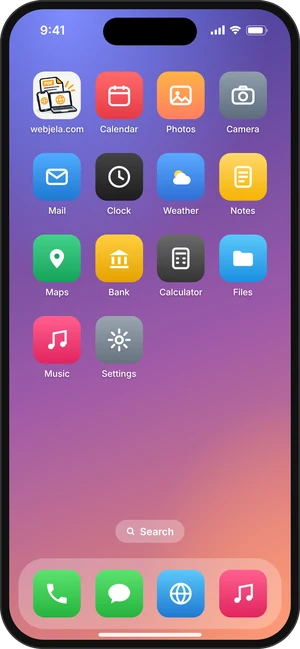
iPhone (Safari)
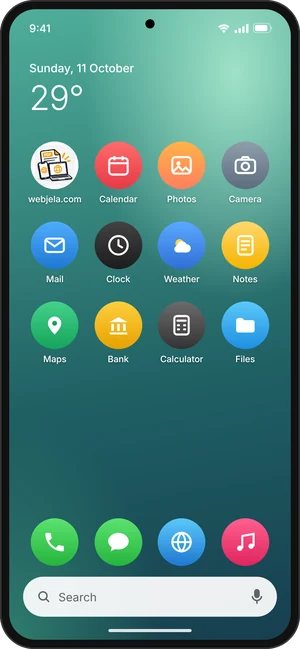
Android (Chrome)
Compare
Other app templates or a printed receipt book, against doing it here.
*A safety cap of 100 saved documents a day protects the app from bot scripts and malware. Need more? Contact us and we’ll raise it for free.
Price
Full features Quotation, Invoice, D.O, Receipt, P.V and P.O for Malaysian businesses at RM 60.00 a year.
Free trial
14 days
no payment needed to start
Yearly
RM 60.00
per year
That is RM 2.50 a month because you can have 2 businesses in the app.
How it works
Start free. Pay only when you want to keep going.
Fill in the form
Your name, mobile number, email and a password. No payment.
Confirm your email
Tap the link we send you. It opens the sign-in page with your email ready.
Sign in. Your free trial starts
14 days with every feature unlocked.
Set up and send
Add your letterhead and customers, then make your first quotation.
Upgrade in the app
Tap Upgrade, then Pay RM 60.00 with FPX online banking (personal or company account) or DuitNow QR.
Your year starts at once
You come back to the app already upgraded and the receipt is emailed to you. Paying early adds the year to the end of your current date.
It takes about a minute. No payment needed.
Fill in the form.
Tap the link in your email.
Sign in. Your 14-day trial starts.
Send your first quotation.
Required
One free trial per mobile phone number.
We sent a confirmation link to:
Tap the link in that email. It opens the sign-in page and your free trial starts when you sign in.
Can't find it? Check your spam or promotions folder.
Already have an account? Sign in.
Do I need to install anything?
No. It runs in your browser. PC, Mac, tablet or mobile phone.
What if I stop paying?
Your documents stay readable and you can download them all. Only new ones pause.
Can anyone else see my customers?
No. Each account is private and other users can't see your customers or documents.
Can I take my data out?
Any time, in one click. Customers, settings and every document.
Does it handle SST?
Yes. Tick the box and set your rate.
Can I use two business names?
Yes, up to 2. Set them all and switch between them. Need more? Contact us.
How do I pay?
Inside the app. Tap Upgrade, then Pay RM 60.00 with FPX online banking (personal or company account) or DuitNow QR. Your account is upgraded at once.
What happens when the trial ends?
Everything you made stays. Upgrade any time to carry on making new documents.
